In today’s fast-paced business environment, RevOps (Revenue Operations) has become a critical function for organizations aiming to drive growth and optimize operations across marketing, sales, and customer success. A well-built RevOps tech stack is not just about having the right tools; it’s about aligning them seamlessly to support your business growth at scale. With a carefully chosen combination of platforms like Salesforce, HubSpot, Outreach, and data enrichment tools, you can streamline processes, improve efficiency, and drive revenue.
Here’s how you can build a RevOps tech stack that scales:
1. Understand Your RevOps Goals
Before selecting tools, it’s essential to define clearly what you want your RevOps team to achieve. RevOps encompasses a broad range of activities, including lead generation, pipeline management, data analytics, and post-sales support. Think about the following:
- Revenue Growth: How will the tech stack help increase revenue?
- Efficiency: How will it streamline operations and eliminate silos?
- Data-Driven Decisions: How will it improve decision-making with accurate, real-time data?
Once you’ve defined these goals, you’ll have a clearer understanding of which tools will best support your business objectives.
2. Salesforce: The Backbone of Your CRM
When building a scalable RevOps tech stack, Salesforce is often the centerpiece. As a robust Customer Relationship Management (CRM) system, it serves as the foundation of your data-driven sales and marketing processes.
Why Salesforce?
- Customization and Scalability: Salesforce can be tailored to fit your unique sales processes and can scale as your business grows.
- Data Centralization: It consolidates all customer data in one place, ensuring your teams (sales, marketing, customer success) are working from the same information.
- Integration: Salesforce integrates seamlessly with other tools in your tech stack, ensuring smooth workflows and data consistency across your entire tech stack.
What to Do?
- Ensure Salesforce is properly configured to align with your sales funnel and customer journey.
- Invest in Salesforce reports and dashboards to get real-time insights into your performance and identify areas for improvement.
3. HubSpot: Strengthening Marketing Automation and Lead Generation
For many businesses, HubSpot plays a critical role in automating marketing processes, generating leads, and nurturing relationships. It complements Salesforce by driving inbound marketing and automating lead capture and nurturing.
Why HubSpot?
- Lead Generation & Nurturing: HubSpot is a powerhouse for capturing and nurturing leads. With its email marketing, social media scheduling, and landing page creation capabilities, it enables you to automate most of your marketing efforts.
- Ease of Use: HubSpot is intuitive, making it easier for marketing teams to manage campaigns without heavy technical expertise.
- Integration with Salesforce: HubSpot seamlessly integrates with Salesforce, allowing for smooth data flow from marketing to sales.
What to Do?
- Set up lead capture forms, automated email workflows, and scoring systems to ensure consistent and effective lead nurturing.
- Use HubSpot’s CRM tools to track interactions, from the first point of contact to when a lead becomes a customer.
4. Outreach: Supercharging Sales Outreach and Engagement
When it comes to sales communication, Outreach is a powerful platform designed to enhance sales engagement through automated workflows, sequences, and multi-channel communication (including email, phone calls, social media, etc.).
Why Outreach?
- Sales Engagement: Outreach enables sales reps to automate follow-ups and track engagement with prospects, ensuring timely and relevant communication.
- Visibility & Reporting: Sales leaders can gain insights into sales rep performance, pipeline health, and team activities.
- Seamless Integration: Outreach integrates directly with Salesforce and other tools in your tech stack, giving your sales team a single view of their outreach and performance.
What to Do?
- Create personalized, multi-touch sales sequences to increase your chances of engaging prospects.
- Set up dashboards in Salesforce to track metrics, such as email opens, clicks, and responses, in real-time, to optimize outreach.
5. Data Enrichment Platforms: Enhancing the Quality of Your Data
Data quality is the backbone of any successful RevOps strategy. Without accurate and up-to-date information, your sales and marketing teams will struggle to close deals effectively. Data enrichment platforms, such as Clearbit, ZoomInfo, and LeadGenius, help improve the quality of your customer and lead data by appending missing information, including company size, industry, job titles, and other relevant details.
Why Data Enrichment?
- Better Targeting: Enhanced data ensures you’re targeting the right leads with the most relevant offers, thereby increasing conversion rates.
- Improved Lead Scoring: Enriched data allows you to build more accurate lead scoring models, improving the efficiency of your sales team.
- Time Savings: Data enrichment automates the process of researching and gathering valuable lead information, allowing your team to focus on selling.
What to Do?
- Set up automated data enrichment to ensure that all new leads have access to the most relevant information available in your CRM.
- Use enriched data to refine your segmentation and targeting strategies for both marketing and sales teams.
6. Aligning and Integrating Your Tech Stack
Once you’ve selected the tools that best fit your needs, it’s essential to ensure they integrate and work seamlessly together. Integration is key to ensuring that data flows seamlessly between your tech stack components and that your teams are working from the same data.
Why Integration Matters:
- Unified Data: Without integration, you risk siloed data, which can lead to inefficiencies and missed opportunities.
- Efficiency Gains: Integration allows you to automate manual processes, reducing errors and saving time.
- Holistic View of the Customer: When integrated, your teams can gain a comprehensive view of the customer journey—from the initial interaction to post-sale support.
What to Do?
- Utilize tools like Zapier, MuleSoft, or Salesforce’s native integration capabilities to connect your tools.
- Set up bi-directional syncs to ensure data flows seamlessly between platforms (Salesforce, HubSpot, Outreach, and data enrichment tools), maintaining data accuracy and consistency.
7. Implement Ongoing Monitoring & Optimization
A tech stack is never “done.” As your business evolves, so too must your RevOps processes and tools. Regularly monitor performance and look for opportunities to optimize.
Why Monitoring & Optimization?
- Adaptability: As new features are released or your business needs evolve, your stack should be agile enough to accommodate change.
- Performance Insights: Ongoing analysis will allow you to identify bottlenecks, inefficiencies, or gaps in your tech stack.
- Scalability: Continuous improvement ensures that your tech stack scales with your business, rather than limiting growth.
What to Do?
- Establish regular review cycles (quarterly or biannually) to assess the performance of each tool.
- Leverage analytics to identify areas where technology can be better utilized to streamline processes and drive results.
Conclusion: Building a Tech Stack That Scales
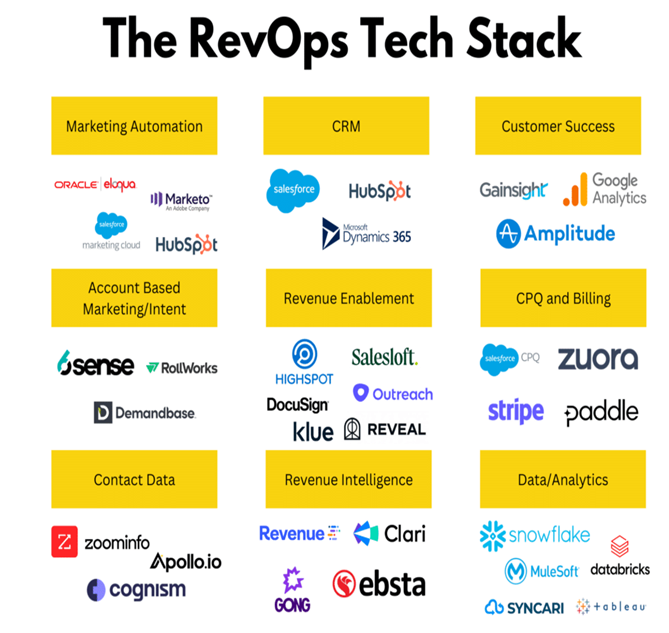
Building a RevOps tech stack that scales isn’t just about picking the most popular tools. It’s about aligning each platform—Salesforce, HubSpot, Outreach, data enrichment platforms, and others—to your unique business needs and goals. By focusing on integration, customization, and ongoing optimization, you can create a tech stack that not only supports your business growth today but also scales with you into the future.
As your company grows, your RevOps tech stack should evolve to meet new challenges and opportunities, enabling your team to be more efficient, productive, and aligned in their efforts to drive revenue.
Leave a Reply